
Timeline
Manage Event Communication with a Single Touch, Make Every Moment Precious!
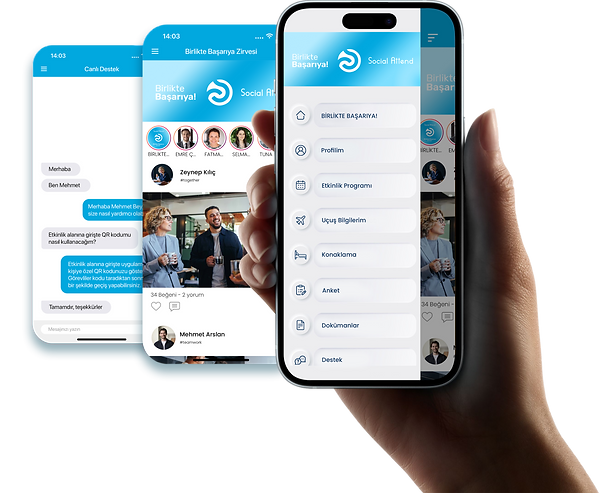
Manage all announcements, information, and interactions from before to after the event, creating a fast, sustainable, and seamless event experience for both the organizing team and participants.



Personal Content
Live Support
Activity Selection

Personal Content
Provide attendees with personalized event details such as flight and transfer information, hotel accommodation, room assignments, and other travel arrangements through their individual profiles. Make it easy for attendees to access the information they need and keep communication throughout the organization process fast and seamless.

Live Support
Allow attendees to contact event organizers directly through the mobile app and receive quick responses to their questions, feedback, and requests. Keep communication accessible throughout the event by bringing attendee support together in a single channel.

News Feed
Share event-related news, announcements, and updates with attendees through photos, text, and video content. Choose to make content sharing available to all attendees or limit it to administrators, supporting communication and engagement throughout the event.

Activity Selection
List the activities available as part of your event and allow attendees to select and register for the ones they are interested in. Track their selections to quickly access up-to-date information about participation.

Push Notification– Announcements
Send real-time notifications containing content or links to deliver important information to attendees at the right time. Notifications can be sent to all attendees, selected groups, or specific individuals based on your event requirements.

Program
Present event dates, times, venues, rooms, and session details in a clear and organized program. Help attendees easily follow the event schedule and quickly access the information they need throughout the event.

Transfer Selection
Provide attendees with their transfer information or allow them to choose from available transfer times. Track transfer preferences by attendee to help manage transportation arrangements in a more organized and efficient way.

Flight Selection
Allow attendees to select from the group flights assigned to them through the mobile app. Track their selections through the admin panel to make travel planning more organized and easier to manage.

Flight Information
Give attendees access to their personalized flight information through the mobile app. Provide real-time flight status, alerts, and estimated delay updates to keep attendees informed throughout their journey.

My Profile
Create individual attendee profiles to provide access to mobile app content and features. Profiles can also be used for content sharing, comments, surveys, and other features available as part of the event.

My QR Code - Fast Pass
Assign personalized QR codes to attendees for quick access to event venues, restaurants, workshops, and other designated areas. Track entries through the QR code verification app and monitor attendance in real time.

Accomodation
Allow attendees to make their accommodation and room preferences through the mobile app on a designated date. Track room selections and information about shared accommodations through the admin panel to simplify accommodation planning.

Speakers
Present information about event speakers, including their photos, biographies, contact details, and scheduled sessions. Help attendees easily access speaker information while following the event program.

Sponsors
Showcase your event sponsors along with their sponsorship categories, company information, and website links. Highlight sponsorship levels such as Gold and Silver to strengthen sponsor visibility and communicate their role within the event.

Ask a Question
Allow attendees to submit questions to speakers directly through the mobile app during scheduled sessions. Questions can be displayed with or without the attendee’s name, providing flexibility while encouraging interaction during sessions.

Your Photos -
Facial Recognition Technologies
Match event photos with attendees’ profile photos to help them easily access their personalized event photos. This service is provided through Event Photos, a Social Attend brand, using AI-powered facial recognition technology.

Photo Gallery
Make event photos available to attendees through the mobile app. Allow attendees to view their event photos and save them directly to their devices.

Video Gallery
Make videos created as part of the event available to attendees through the mobile app. Keep event videos accessible in one place, allowing attendees to view the content both during and after the event.

Documents
Share presentations, PDF files, Word documents, and other event-related materials with attendees through the mobile app. Make essential documents easy for attendees to access and view whenever they need them.

Survey
Create surveys with different question types and answer options to collect feedback from attendees before or after the event. Allow attendees to respond easily through the mobile app and gather valuable feedback about the event.

Opening Video
Present an event-specific introduction or opening video to attendees on the mobile app’s opening screen. Create a strong first impression by visually communicating the theme and key message of your event from the moment attendees open the app.

Weather
Provide attendees with current weather information for the event location through the mobile app. This is particularly useful for outdoor events, helping attendees stay informed about weather conditions in advance.

Venue Map
Provide attendees with a digital map of the event venue, including rooms, areas, and key locations. Help attendees become familiar with the venue and quickly find the locations they need throughout the event.

Multilingual Support
Provide attendees with a digital map of the event venue, including rooms, areas, and key locations. Help attendees become familiar with the venue and quickly find the locations they need throughout the event.

Quiz
Organize interactive quizzes around your company, products, general knowledge, or other event-related topics. Publish questions all at once or at scheduled intervals to create competitive experiences where participants can be rewarded for answering correctly and quickly.

Shake to Win & Shake to Donate
Let attendees participate in event-based contests or social responsibility activities by shaking their phones at designated times. Use Shake to Win to offer gifts and prizes, or Shake to Donate to support social responsibility initiatives on behalf of participating attendees.

Offline Mode
Allow attendees to access previously loaded content such as the program and speaker information when internet access or network coverage is limited. This helps attendees access essential event information even when connectivity is unavailable or unreliable.

Analysis and Reporting
Track attendance and event performance by reporting on data collected before and after the event. Analyze information related to the organization process to evaluate event results and support future planning.

Public & Private Groups
Make the event app available to all attendees or create private groups accessible only to selected individuals. Customize attendee access according to the structure and requirements of your event.

Online & Technical Operational Support
Receive online operational support and, when required, on-site technical assistance at the event venue. Get support for managing requests and technical processes efficiently, helping your event operations run smoothly throughout the event.